The Pain Tracker plugin lets you keep your diary in a ChatGPT conversation. It works with the same account and the same entries as the web app, Telegram and Discord.
The plugin is coming to ChatGPT and is not in the ChatGPT directory yet. These pages describe how it will work once it is available.
What you can do
- Log a pain entry or update one by describing your day. See Logging Entries in ChatGPT.
- Review your entries in a calendar and get a summary of a period. See ChatGPT Calendar and Summaries.
- Check and change your reminder, language and time zone, and connect Telegram or Discord. See ChatGPT Reminders and Settings.
ChatGPT shows the results as cards in the chat.
Connect your account
- Open the Pain Tracker plugin in ChatGPT and choose Connect.
- Sign in to Pain Tracker. If you do not have an account yet, you can create one on the same page.
- Check the permissions ChatGPT asks for and choose Allow. You are sent back to ChatGPT, and the connection is ready.
The page with the permissions is valid for 10 minutes. If it has expired, start the connection again in ChatGPT.
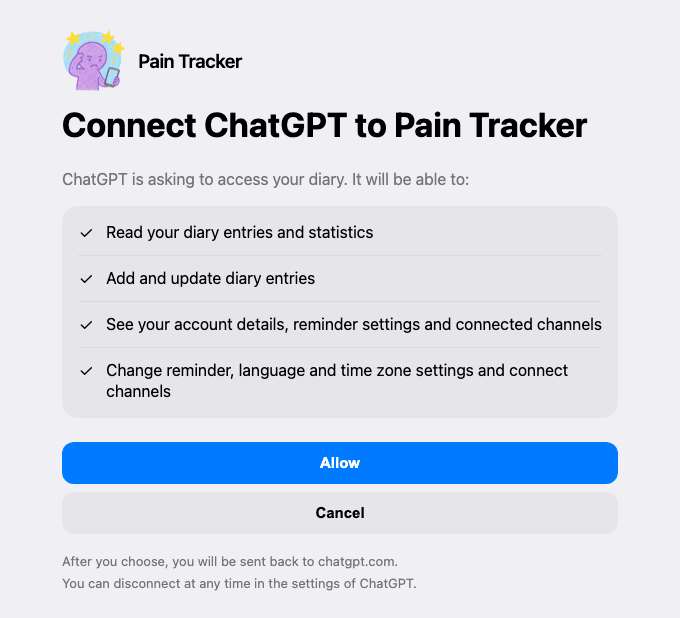
What access ChatGPT gets
The permission page lists four permissions. ChatGPT gets them only if you choose Allow:
- Read your diary entries and statistics.
- Add and update diary entries.
- See your account details, reminder settings and connected channels.
- Change reminder, language and time zone settings and connect channels.
ChatGPT works only with your own diary. It cannot delete entries or your account.
You can see the connection and remove it in the web app settings. See Connected Apps and Privacy Policy.
If something does not work, see ChatGPT Troubleshooting.